Cartoon Me Guide
Turn your photo into Minecraft voxel art
Blocky characters. Pixelated worlds. Your selfie as a Minecraft character. Nobody else does this.


Short answer
You've seen Ghibli filters. You've seen anime filters.
Last updated 2026-04-18
Voxel Art from Photos Is a New Thing
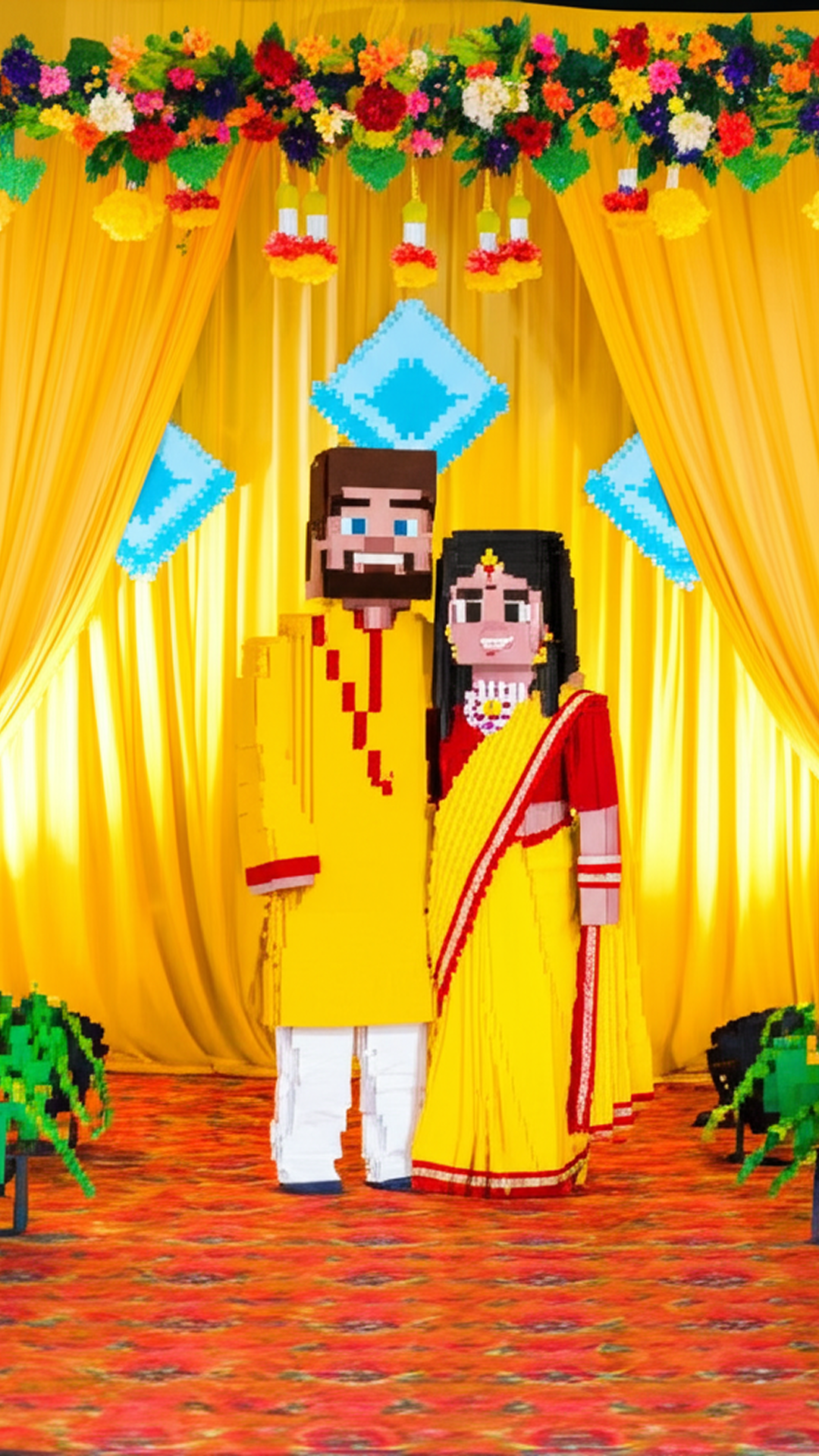
You've seen Ghibli filters. You've seen anime filters. You've seen cartoon selfies. But have you seen your wedding photo turned into Minecraft characters? Or your cat rendered as a voxel art figure? That's what 3DMyne and MineDraft do. They take any photo and transform it into 3D voxel art. Not flat pixel art. Full 3D blocky characters with depth, shadows, and that unmistakable Minecraft aesthetic. The results look like someone spent hours building you in Minecraft, block by block. But it takes seconds. This is a style that no other cartoon app offers. ChatGPT can't do it. Lensa can't do it. ToonMe can't do it. It's unique to Cartoon Me.
Two Voxel Styles, Two Vibes
3DMyne gives you the full 3D Minecraft character treatment. Your face becomes a blocky figure with that iconic Minecraft look: square head, pixelated features, blocky body. But the backgrounds stay realistic, creating this surreal mix of Minecraft characters in real-world settings. The results are genuinely funny and share-worthy. MineDraft is more subtle. It keeps more detail from the original photo while adding the voxel/pixel aesthetic. Think of it as the difference between full Minecraft and Minecraft with a high-res texture pack. Both styles work on selfies, group photos, pets, landscapes, even wedding photos (the Indian wedding voxel art is incredible).
How to do it
Step 1: Pick a Photo with Clear Subjects
Voxel art works best when there are clear people or objects in the photo. Group photos, couples, pets, portraits. The AI needs to identify who or what to voxelize.
Step 2: Choose 3DMyne or MineDraft
3DMyne for the full blocky Minecraft look. MineDraft for a more detailed voxel aesthetic. Try both on the same photo. The results are completely different and both are worth saving.
Step 3: Share and Watch People React
This is the style that gets the most reactions. People double-take when they see their photo as voxel art. It's unexpected, funny, and uniquely cool. Share on Instagram, TikTok, or send to friends. The reactions are guaranteed.
Mistakes to avoid
- 1Using blurry or dark photos. The AI needs clear details to map onto the voxel grid. Well-lit photos with visible faces produce the best results.
- 2Not trying group photos. Voxel art with multiple people is hilarious. Wedding photos, family portraits, and friend group selfies all produce amazing results.
- 3Only sharing the voxel version. The before/after comparison is what makes this shareable. Post both side by side.
- 4Assuming this is just a filter. It's not. The AI is generating a completely new 3D interpretation of your photo. That's why the results look like someone actually built you in Minecraft.
The Only App That Does Minecraft-Style Photos
Cartoon Me's 3DMyne and MineDraft styles are unique. No other photo app transforms your pictures into 3D voxel art. Not ChatGPT. Not Lensa. Not ToonMe. If you want the Minecraft look from your photos, Cartoon Me is literally the only option. Download free on iOS and Android.
Learn more about Cartoon Me →FAQ
Can ChatGPT make Minecraft-style photos?+
ChatGPT can attempt pixel art but it can't produce the 3D voxel character style that 3DMyne creates. The blocky 3D figure in a real-world background look is unique to Cartoon Me.
Does it work on pet photos?+
Yes. Pets as Minecraft characters is genuinely one of the funniest things this app produces. Cats and dogs work especially well because of their distinct shapes.
Is the output high resolution?+
Yes. The voxel art is generated at high resolution suitable for sharing, printing, or using as wallpapers.
Related Guides
Guide
Ghibli Style Photo Filter
Turn your photos into Studio Ghibli art without ChatGPT. No login, no account, no photo uploads to OpenAI. Get the Ghibli look on iPhone and Android in seconds.
Guide
Anime Style Photo Filter
Turn your photos into anime art instantly. No drawing skills needed. Anime, manga, and Japanese art styles from your selfies. Free on iOS and Android.
Best Apps
Best Cartoon App for iPhone
We tested every cartoon and AI art app on iPhone. Cartoon Me, Lensa, ToonMe, and more. Find the best app for Ghibli, anime, sketch, and comic art styles.